Your stack

Everything that speaks PostgreSQL already speaks FleetSQL

There is no FleetSQL API to integrate against, and that is the feature. Your fleet data lands in a standard PostgreSQL database, so the tools your team already runs connect with a host, a port and a password — no connector to build, no vendor SDK to track.

Protocol
Standard PostgreSQL wire
Setup
A connection string
Drivers
Every language has one
Lock-in
None — it is your database

Dashboards and BI

Power BI, Metabase, Grafana, Tableau, Superset, Looker and every other BI tool ships a PostgreSQL connector, so the integration is a form with five fields rather than a project. Point the tool at the database, build against w_evnt_trips, the other event tables and w_prop_unit, and refresh on whatever schedule the tool already uses.

Nothing in the database favours one of them. The screenshot on this page is Grafana because it is the board we can show you running, not because it is where the data belongs — a fleet that reports in Power BI points Power BI at the same host and gets the same numbers, since the numbers are SQL rather than a feature of a dashboard tool.

Because the data is a database rather than a report export, drill-down works the way analysts expect: a chart of distance by month clicks through to the vehicle, then to the day, then to the individual trips and speeding events behind the number — without anyone re-running an extraction to answer the follow-up question.

  • Power BI / Tableau / Looker — where fleet data joins the rest of the business
  • Metabase / Superset — self-service questions for people who do not write SQL
  • Grafana — operational panels and threshold alerting straight off SQL queries
  • DBeaver / psql — for the person who just wants to check a number
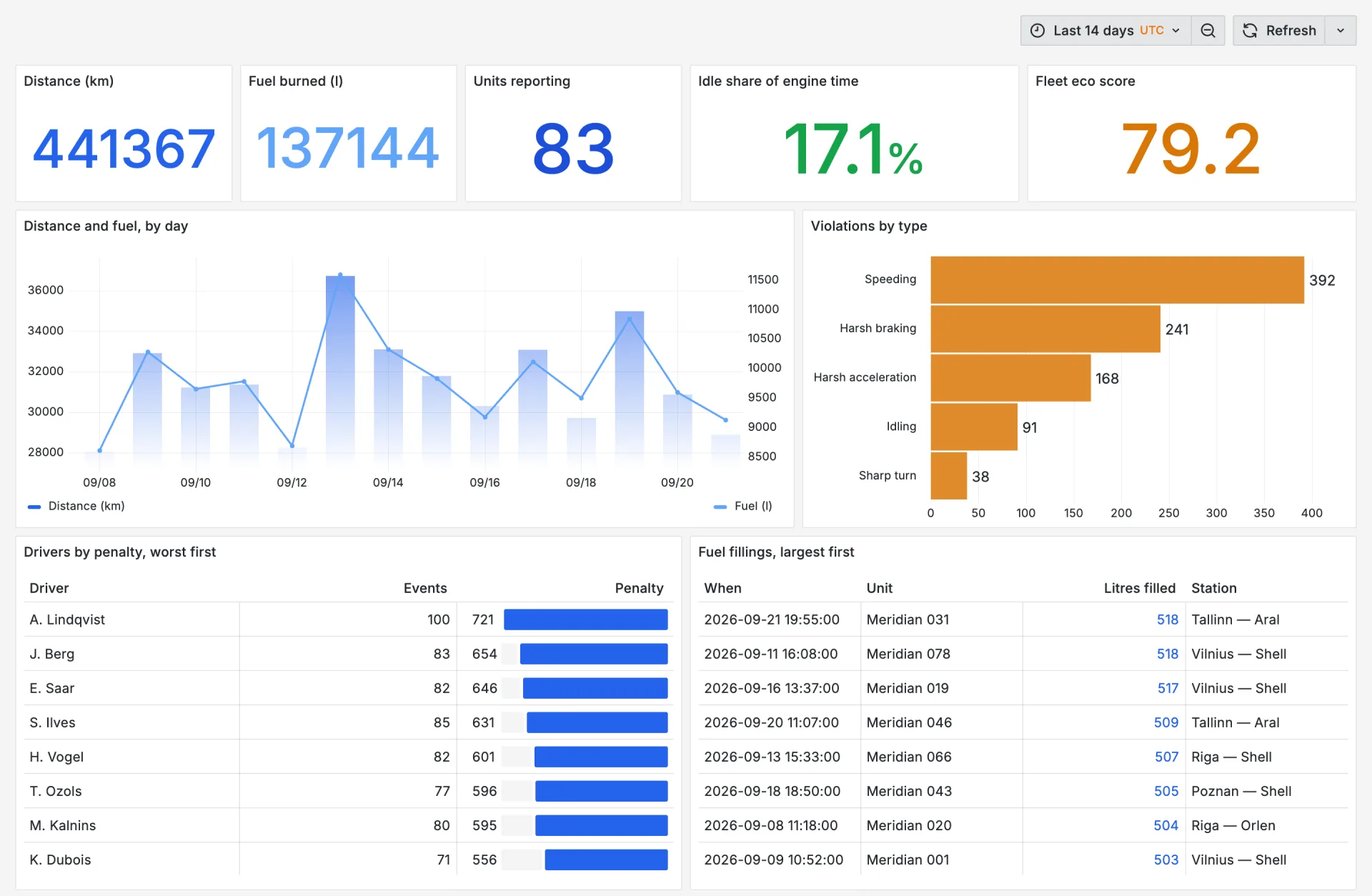
A Grafana dashboard reading a FleetSQL database: distance, fuel, reporting units, idle share and eco score, a daily distance-and-fuel chart, violations by type, drivers by penalty and the largest fuel fillings
Grafana on a FleetSQL database — one tool's view of it. Power BI, Metabase and Tableau take the same tables through their own PostgreSQL connector.

Power BI, in practice

Power BI is where most fleets already report, so it is worth being concrete. In Power BI Desktop it is Get Data → Database → PostgreSQL database, then the host and database name exactly as the console shows them and the read-only role issued for the tool. The tables arrive in the navigator under the public schema: w_prop_unit, the w_evnt_* events, and any w_rprt_* tables for the report templates you enabled.

The one choice worth thinking about is Import against DirectQuery. Import copies rows into the model, which is fast to slice and refreshes on the schedule Power BI already runs — the sensible default for a few million trip rows. DirectQuery leaves the history in Postgres and pushes each visual's query down to it, which suits three years of events you would rather not duplicate into a model. Both read the same tables, and neither needs anything installed on our side.

What the model can then do is the actual point: fleet data joins the rest of the business inside Power BI — cost centres, customer contracts, the ERP extract somebody already publishes. That join is what a telematics reporting screen cannot do at any price, and it is the reason the data has to sit in a database you can point a tool at.

  • Credentials — a PostgreSQL role per person, read-only, revocable without disturbing anyone else's access
  • Encryption — the server requires TLS, so leave the connector's encrypted-connection option on
  • Scheduled refresh — an ordinary hosted PostgreSQL source, configured the way your tenant configures any other one
  • Modellingunit_id is the key every table joins on, which is the relationship to draw first

Notebooks, Python and machine learning

History in a database is what makes forecasting and anomaly detection possible at all — a report export is a snapshot, and a model needs a series. With up to three years backfilled on the first run, a notebook has something to learn from on day one.

Pull a fleet-wide daily series into pandas
import pandas as pd
from sqlalchemy import create_engine

engine = create_engine("postgresql://user:password@host:5432/fleet?sslmode=require")

trips = pd.read_sql("""
    SELECT unit_id,
           (start_time AT TIME ZONE 'Europe/Warsaw')::date AS day,
           SUM(distance_m) / 1000.0 AS km,
           COUNT(*)                 AS trips,
           MAX(max_speed)           AS max_kmh
    FROM   w_evnt_trips
    WHERE  start_time >= NOW() - INTERVAL '2 years'
    GROUP  BY 1, 2
""", engine, parse_dates=["day"])

daily = trips.pivot_table(index="day", values="km", aggfunc="sum")

AI agents and text-to-SQL

Every serious agent framework and MCP server speaks PostgreSQL, which makes a FleetSQL database directly askable in plain language: "which trucks idled more than three hours yesterday" becomes a query the agent writes, runs and explains. No custom tool wrapper, no scraping a reporting UI.

The practical requirement is a schema an agent can reason about, which is why table names carry their own provenance — w_prop_, w_evnt_, w_rprt_ — and why every database ships a _meta_data_sources registry an agent can read first: what exists, at what grain, last synced when. A wide, opaque schema is what makes text-to-SQL hallucinate; a documented, self-describing one is what makes it useful.

Automation and alerting

n8n, Zapier, Airflow, cron — anything that can run a query on a schedule can turn a row into an action. A drain over twenty litres becomes a webhook into your ticketing system; a vehicle whose last_message_time has gone quiet becomes a maintenance task; a vehicle crossing a speeding threshold becomes a line in the weekly review.

Because the alert logic lives in SQL rather than inside a telematics platform's notification builder, it is reviewable, version-controllable and testable against history — you can run this month's rule against last year to see how often it would have fired.

Joining the rest of the business

The highest-value integration is usually not a tool at all: it is the table you create next to ours. Fuel card transactions, customer contracts, ERP cost centres, maintenance records — once they sit in the same database as the telemetry, questions that used to require three exports and a spreadsheet become one query.

That is also the point at which fleet data starts answering commercial questions rather than operational ones: cost per delivery, profitability per customer, the real cost of an empty return leg. Asset Track builds those joins as a service when the sources are messier than a CSV — see Wialon integration services.

Frequently asked questions

Do we need a special driver or connector? +

No. It is a standard PostgreSQL database, so whatever PostgreSQL driver your language or BI tool already ships is the integration. There is no FleetSQL client library, and nothing to update when we release.

Can we connect an LLM agent or MCP server to it? +

Yes, and it works better than pointing one at a telematics API, because the schema is small and documented. Agents fail on wide, cryptic schemas; a handful of plainly named tables with published columns is close to the best case for text-to-SQL.

Can Power BI refresh from it on a schedule? +

Yes. From Power BI's side it is an ordinary hosted PostgreSQL source, so scheduled refresh is set up exactly as it is for any other one in your tenant — including whether your setup routes it through a gateway, which is a Power BI question rather than a FleetSQL one. What we provide is the part that has to be true either way: a reachable host, TLS, and a read-only role that can be revoked on its own.

Is there a read-only user for BI tools? +

Yes. Dashboards and agents should connect with a read-only role rather than the credentials your own jobs use, so a misbehaving query or a curious analyst cannot modify anything. Credentials are issued per integration, so one can be revoked without disturbing the rest.

Can we replicate the database into our own warehouse? +

Yes. Standard PostgreSQL replication and ETL tools all work, and teams that already run Snowflake or BigQuery usually schedule a copy rather than pointing dashboards at the operational database. Nothing about the setup prevents it.

Contact

Interested in FleetSQL?

Why FleetSQL

Your telematics data in a PostgreSQL database you control — queryable, joinable, and yours.

Managed, not installed
We run the extraction and the database. You get a connection string.
One database per client
Your own PostgreSQL, hosted in the EU, TLS required.
Your tools, unchanged
Power BI, Grafana, Metabase, psql, pandas — anything that speaks Postgres.
An evaluation first
A trial database on your own fleet before anything is signed.

Or write to us directly: fleetsql@theassettrack.com